
Tap in at the door.
Know who’s on site.
Nexflow Clock is an Android tablet on the wall that your team taps with a fob, a QR code or a PIN. Managers see who’s in, who’s late and who’s out on a job — and every clocked hour flows straight into Timesheet.
The hardware
Ordinary hardware. No special parts to wait for.
The Clock is a standard Android tablet running the Nexflow app. If a tablet is ever damaged, replace it with one from any electronics store, log in, and you’re back up — no proprietary terminal, no waiting on a supplier.
Samsung Galaxy A11 tablet
Nexflow Clock app pre-installed and signed in to your company.
RFID reader + fobs
A fob registered to every employee. Gloves on, no problem.
Quick-release wall mount
Holds the tablet flush to the wall; lifts off in seconds. Lift it off for cleaning or updates and drop it back on — no tools.
Flush wall-mounted USB-C power
Powers the tablet from inside the wall. No cable dangling down.
Sign-in
Three ways to clock in. Pick one, or mix them.
RFID fob
Tap and go. Each employee gets a fob registered to them — ideal for gloved hands and busy doorways.
Included in the kit
QR code
Scan a printed card, or the code the Nexflow app generates on the employee’s phone. No extra hardware.
Card or phone
PIN
A short personal PIN typed on the screen. Nothing to carry, nothing to lose.
No hardware
All three record the same thing: who, when, and in or out. Choose per site.
How it works
A normal day on the Clock
07:58 · Tap in
Tap your fob. The screen confirms your name and start time.
On site
12:30 · Clock out with a reason
Lunch, a delivery, a call-out. Pick the reason so your manager sees you’re out and why — not just “absent”.
Off site · Lunch
13:15 · Tap in again
Carry on. The day’s hours keep adding up in one record.
On site
16:30 · Clock out — or forget
If someone forgets, automatic clock-out closes the day. They can request an adjustment for their manager to approve.
Auto clock-out
For managers
What managers see
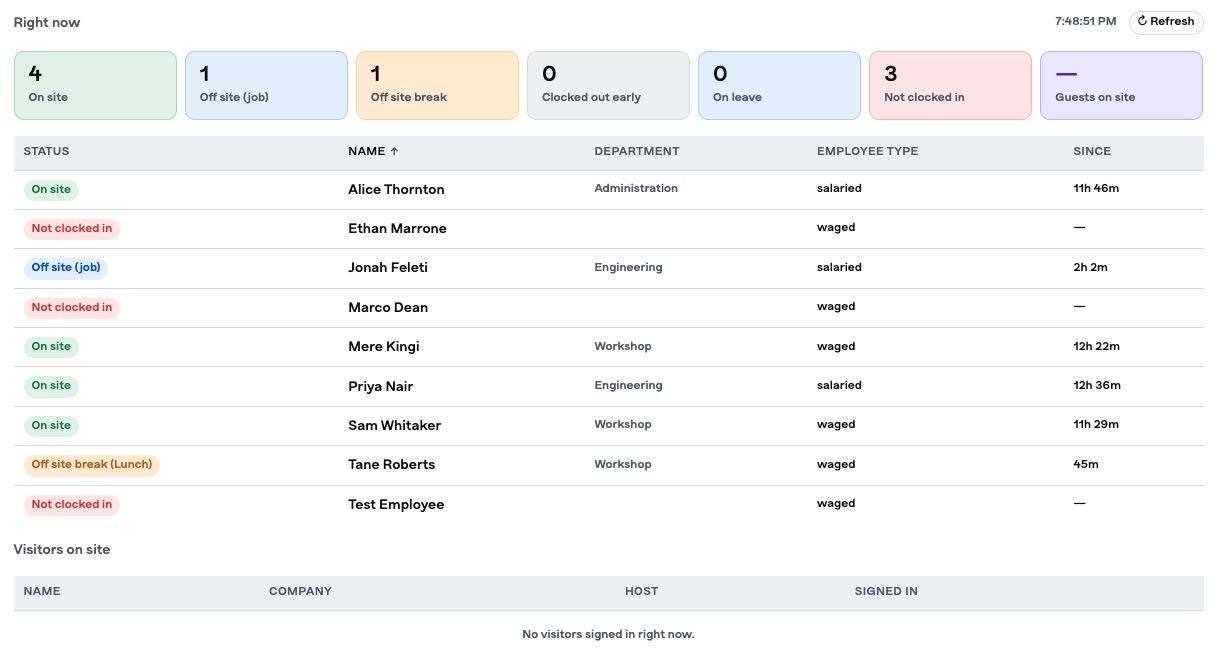
- On site right now. A live board of who’s in the building, updated the moment someone taps.
- Late arrivals. Anyone who clocked in after their scheduled start, flagged without you checking.
- Off site, with a reason. Lunch, a delivery, a call-out — see who’s out, why, and when they came back.
- Overtime. Hours beyond the rostered day, visible as they happen rather than at payroll.
- Clock vs. timesheet. Compare what was clocked against what was submitted and catch the gaps before approval.
- Adjustment requests. Staff ask, you approve or decline. Every change is recorded.
Pairs with Timesheet
Clocked hours land in the weekly timesheet automatically, so staff review instead of re-typing — and the timesheet flags where clocked and claimed hours don’t match. From there it’s approvals and payroll reporting.
Good to know
Practical details
Connectivity
The tablet joins your company Wi-Fi to sync with Timesheet.
Anywhere access
Managers use Nexflow from any device with a browser. Nothing to install.
Who sees what
Presence, clock-ins and adjustments are visible only to the roles you choose. Staff see their own; managers see their team.
Replacement
Any Android tablet can run the Clock app. Replacing hardware takes minutes, not weeks.